1. The real problem: not speed, discipline
Odoo has been in place at Cobra since February 2025. On paper, the accounting chain is crystal clear: sales order (SO) → purchase order (PO) → invoice → payment → SEPA batch. Each invoice should point to the order that triggered it — that's what enables the 3-way match (order / receipt / invoice), and therefore automatic price and quantity checks.
In real life, this chain was never applied properly. The accounts-payable setup in place never mastered the tool: invoices were entered "flat," disconnected from their original order, payments rarely reconciled correctly. The result: an Odoo full of unreadable entries, and a chain impossible to follow end to end.
2. The drift, quantified
Before writing a single line, we measured the database's real state (read-only, via XML-RPC). The numbers speak for themselves — out of 5,450 supplier invoices posted since February 2025:
| Symptom of the drift | Count | Amount |
|---|---|---|
| Invoices with no link to a purchase order (PO) | 1,524 | €2,032,524 incl. tax |
| Unpaid / partial for more than 2 months | 241 | €600,531 still to pay |
| — of which prior to 2026 (5-6 months and up) | 130 | €371,762 |
In plain terms: ~€2M of supplier invoices entered off-chain, with no link to any order, and €600k of unpaid invoices lingering for more than two months. That's the cost of the drift — and precisely what the agent keeps from happening again.
An honest caveat, because this site is build in public and not brochure mode: the drift is mostly historical. Of the invoices detached from an order, 1,379 are old (> 2 months) versus 145 recent. It improved over time — but those 145 recent ones prove that without an automatic constraint, human data entry drifts again, every time.
Making the chain readable: the 3 statuses on the order
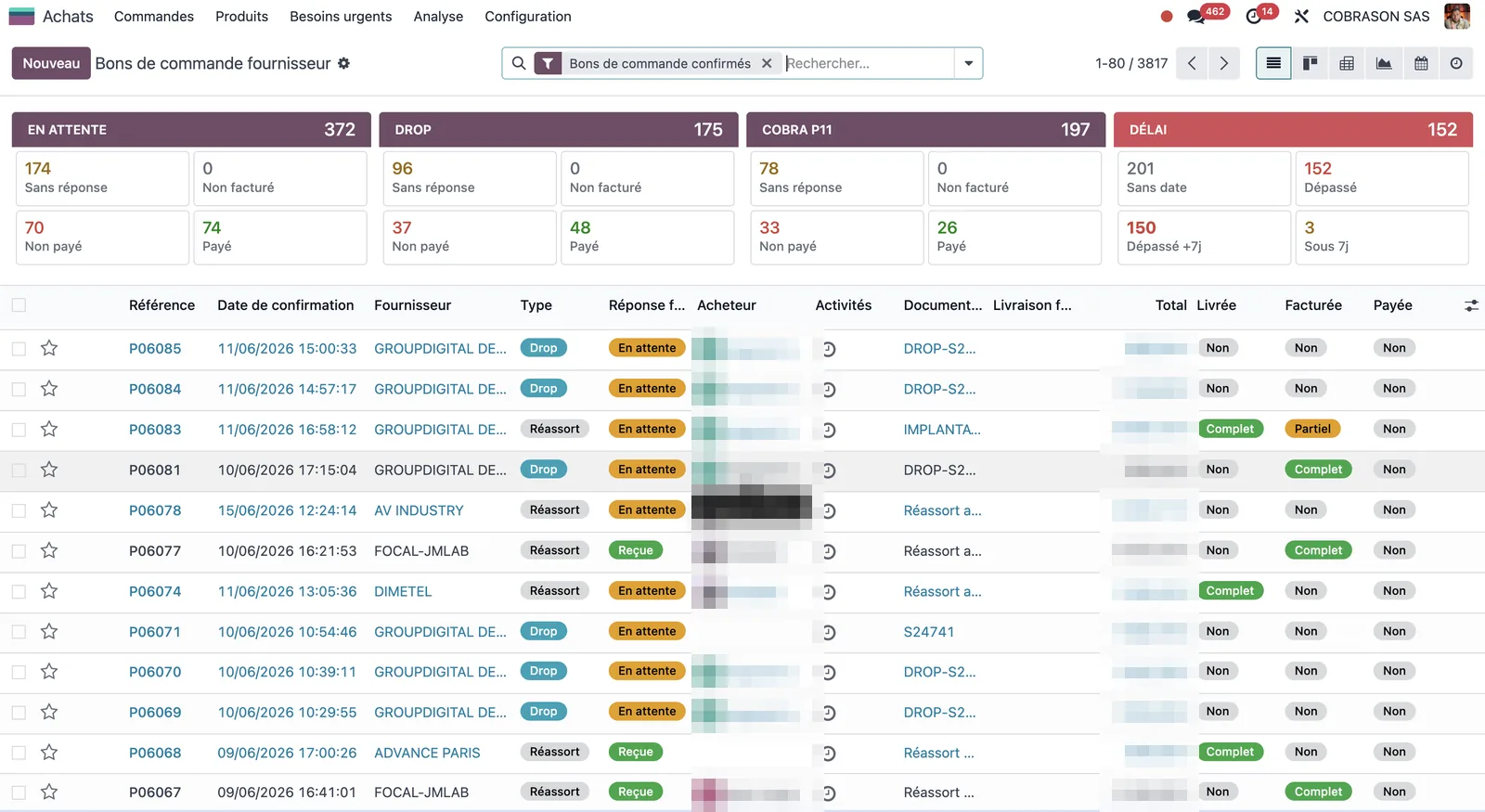
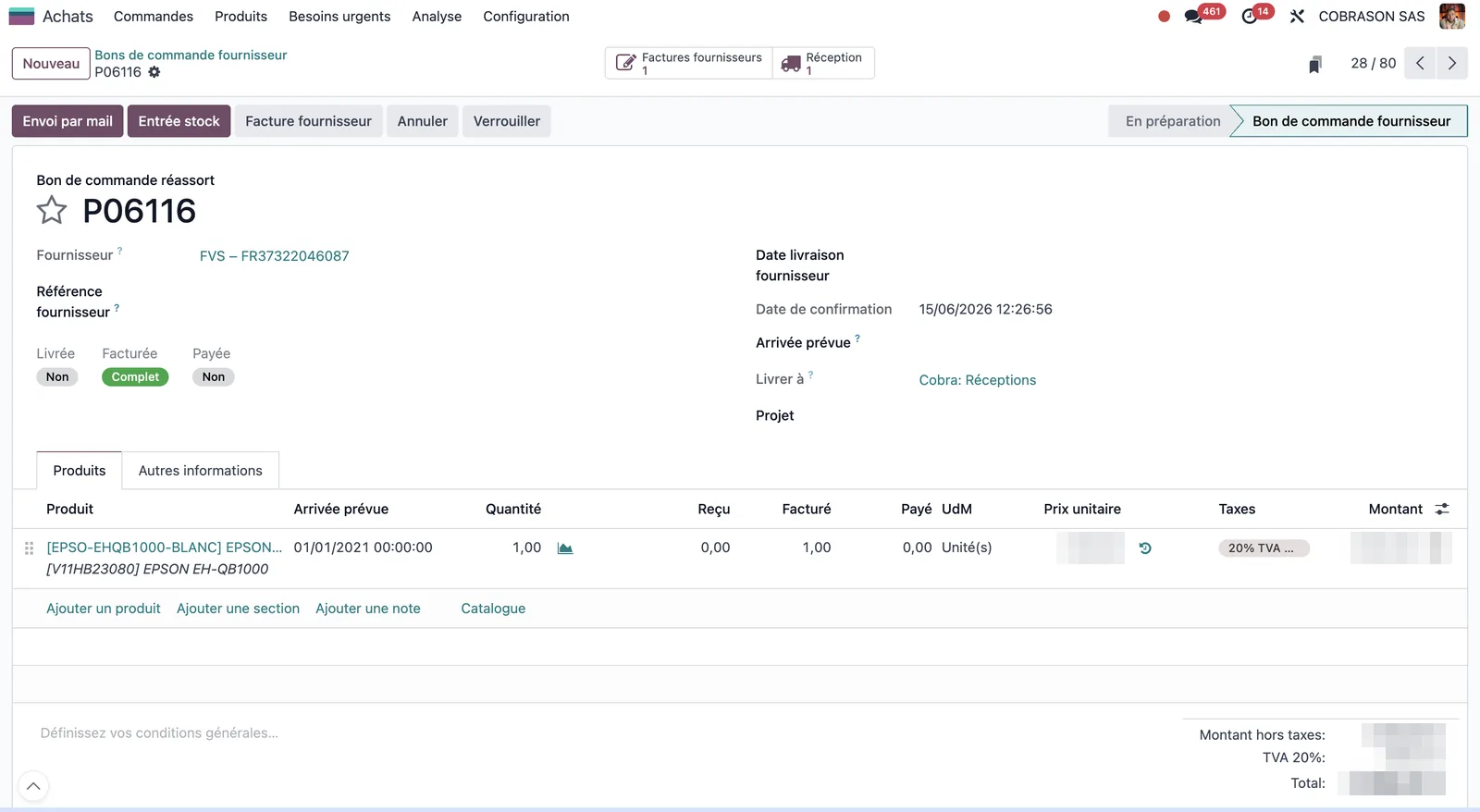
First building block, on the Odoo side: I added three fields on the purchase order (purchase.order) to expose the full state directly from the PO — before, you had to dig through invoices and payments separately.
| Field | Reads as | On confirmed POs |
|---|---|---|
| Delivered | Goods received? | full 3,439 · partial 77 · no 309 |
| Invoiced | Invoice received and linked? | full 3,319 · partial 144 · no 362 |
| Paid | Settled? | full 3,003 · partial 147 · no 675 |
At a glance on an order: delivered? invoiced? paid? The chain becomes readable again — which was impossible with invoices detached from their order.
3. What the agent does (and why it can't drift)
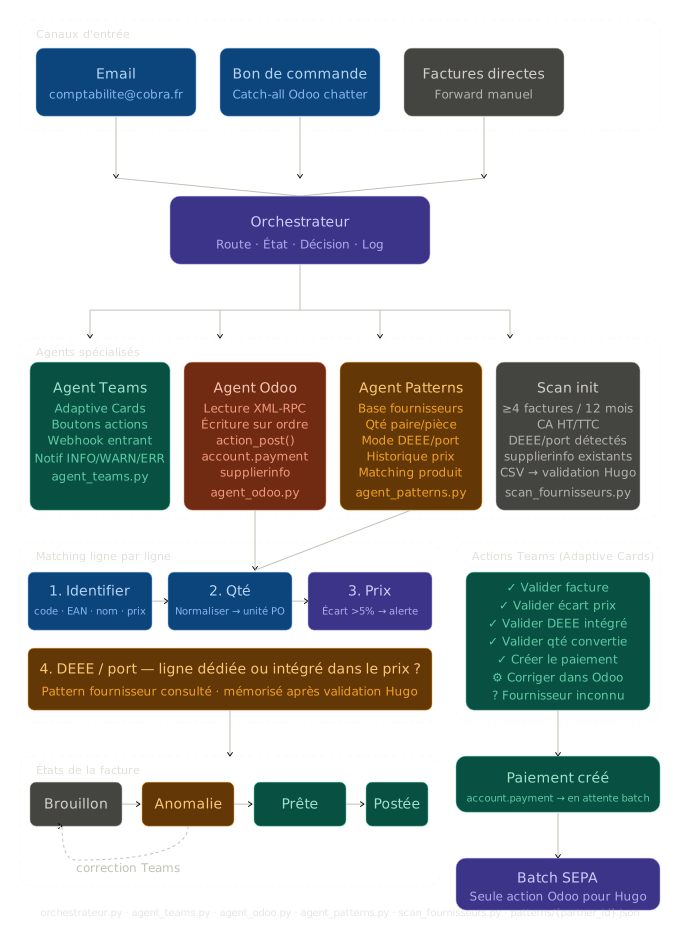
The agent doesn't "help" you enter data better. It replaces data entry with a workflow it's incapable of not following. An invoice's journey, end to end:
- Invoice collection (two sources). Every 15 minutes, the agent picks up invoices wherever they land: PDFs already attached to orders in Odoo (source A), and above all the mailboxes where suppliers converge — including a catch-all — via the Microsoft Graph API (sources B/C). It spots the attachments and email bodies that are invoices, and deduplicates (SHA-256 + message ID).
- Extraction. Depending on the supplier, each invoice is read either by a dedicated parser (known, structured formats, highly reliable) or — the general case — by OCR + Claude API (Opus 4.8 model). Either way, the output is a clean structure with a confidence score: supplier, number, date, lines, amounts, VAT, WEEE, shipping.
- Line-by-line matching. Each line is matched to the exact order line (identification hierarchy: supplier code → EAN → name → price), handling the silent traps (pair/unit quantities, WEEE and shipping bundled in or as a separate line).
- Blocking checks. Duplicate? Price gap > 5%? Order not found? → the invoice doesn't go to draft: it's parked for human handling (the "intervention" channel, or "to sort" if there's no readable order reference in the document).
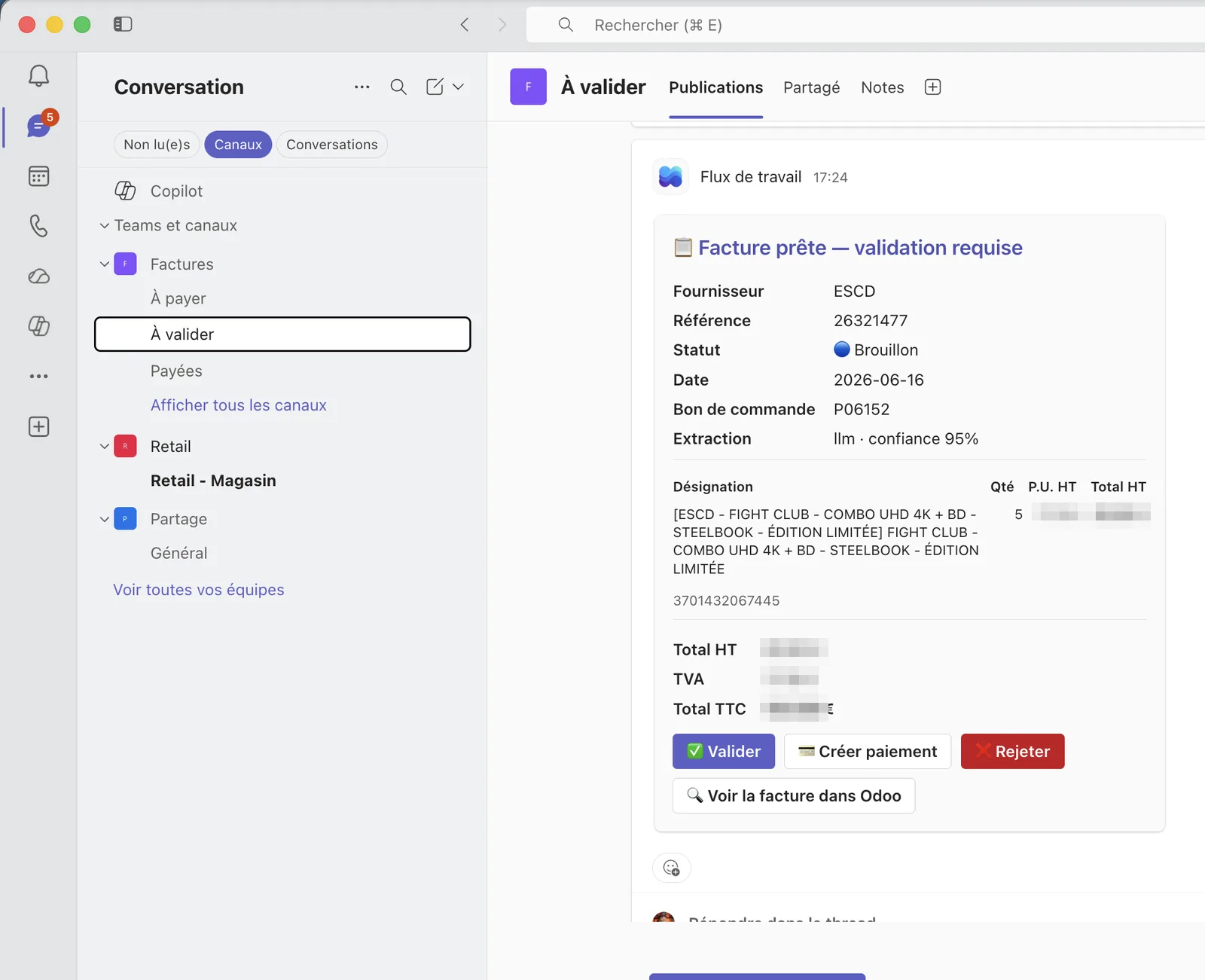
- Human approval in Teams. A card (Adaptive Card) summarizes the invoice and offers the actions in one click. The human never touches the Odoo interface again, except for the weekly SEPA batch.
The four guardrails that make drift structurally impossible:
- Linking guaranteed by design. Every invoice line created points to the exact order line (
purchase_line_id) and fills in the source automatically. The agent can't create a "free" invoice. 100% of what it creates is linked to its order — versus the 28% detached in the human history. - Duplicate prevention. It refuses to create if the supplier reference already exists, or if the order line is already invoiced.
- Price consistency. Invoice vs order gap > 5% → block and request a corrected invoice from the supplier, before any write.
- Consistency. The same rules, every 15 minutes, on every invoice, indefinitely. Code doesn't get tired, never skips the tedious step.
The price-gap check, in code
The "price consistency" guardrail isn't wishful thinking: it's a coded rule that blocks before any write to Odoo. Beyond a 5% gap between the invoiced price and the price negotiated on the order, the agent creates nothing — the invoice is parked and flagged.
TOLERANCE_PRIX = 0.05   # 5%: beyond this, we create NOTHING, the invoice goes to intervention


def controle_ecart_prix(ligne_facture, ligne_commande):
    """Compare the invoiced unit price to the price negotiated on the order (PO).

    ≤ 5%  : minor gap (shipping absorbed, rounding) → the invoice follows the normal flow.
    > 5%  : blocking → no draft is created, the invoice is parked and flagged.
             The human then requests a corrected invoice from the supplier.
    """
    prix_po = ligne_commande.prix_unitaire_ht
    if not prix_po:                  # line with no order reference: not checkable here
        return Verdict(statut="non_controle")

    ecart = (ligne_facture.prix_unitaire_ht - prix_po) / prix_po

    if abs(ecart) <= TOLERANCE_PRIX:
        return Verdict(statut="ok", ecart_pct=round(ecart * 100, 1))

    return Verdict(
        statut="bloquant",
        motif="ecart_prix",
        ecart_pct=round(ecart * 100, 1),
        message=(
            f"Invoiced price {ligne_facture.prix_unitaire_ht:.2f} € "
            f"vs order {prix_po:.2f} € ({ecart:+.1%}) — "
            f"beyond the {TOLERANCE_PRIX:.0%} tolerance"
        ),
    )
A bloquant verdict goes up to the decision engine, which refuses to create the draft and routes the invoice to the "intervention" channel with its reason. That's anti-drift in one function: no human judgment on every invoice, a rule that applies on its own, always.
4. The production architecture on Scaleway
The thing that changes everything compared to the design phase: the agent exists outside my computer. It runs on a Scaleway instance (BASIC3-X2C-4G VM: 2 vCPUs, 4 GB RAM, Paris region), for ~€36/month. French hosting — that matters for accounting data.
- The batch: a
cronevery 15 minutes runs the agent's loop (read email → extraction → matching → Teams cards). - The endpoint: a small Flask server, meanwhile, runs continuously (systemd service) to receive clicks on the Teams card buttons and write back to Odoo. It's reachable via a dedicated subdomain (
agent-factures.cobra.fr, DNS at Gandi) rather than a bare IP, with an HMAC signature on every incoming request. - Reading email: via Microsoft Graph (Microsoft 365 API, application flow), no IMAP. Reading email directly at the source is what makes the agent autonomous: no human intervention to "forward it" an invoice.
- Odoo: Odoo 18 Enterprise, XML-RPC access + API key.
| Layer | Tech |
|---|---|
| Extraction | Claude API (Opus 4.8) · pdfplumber · Tesseract OCR (fr/en) · Poppler |
| Logic | Python 3.14 · pydantic (strict schema) |
| Teams endpoint | Flask · HMAC signature · Adaptive Cards v1.5 via Power Automate |
| Microsoft Graph (application flow) | |
| Hosting | Scaleway instance (Paris) · cron + systemd |
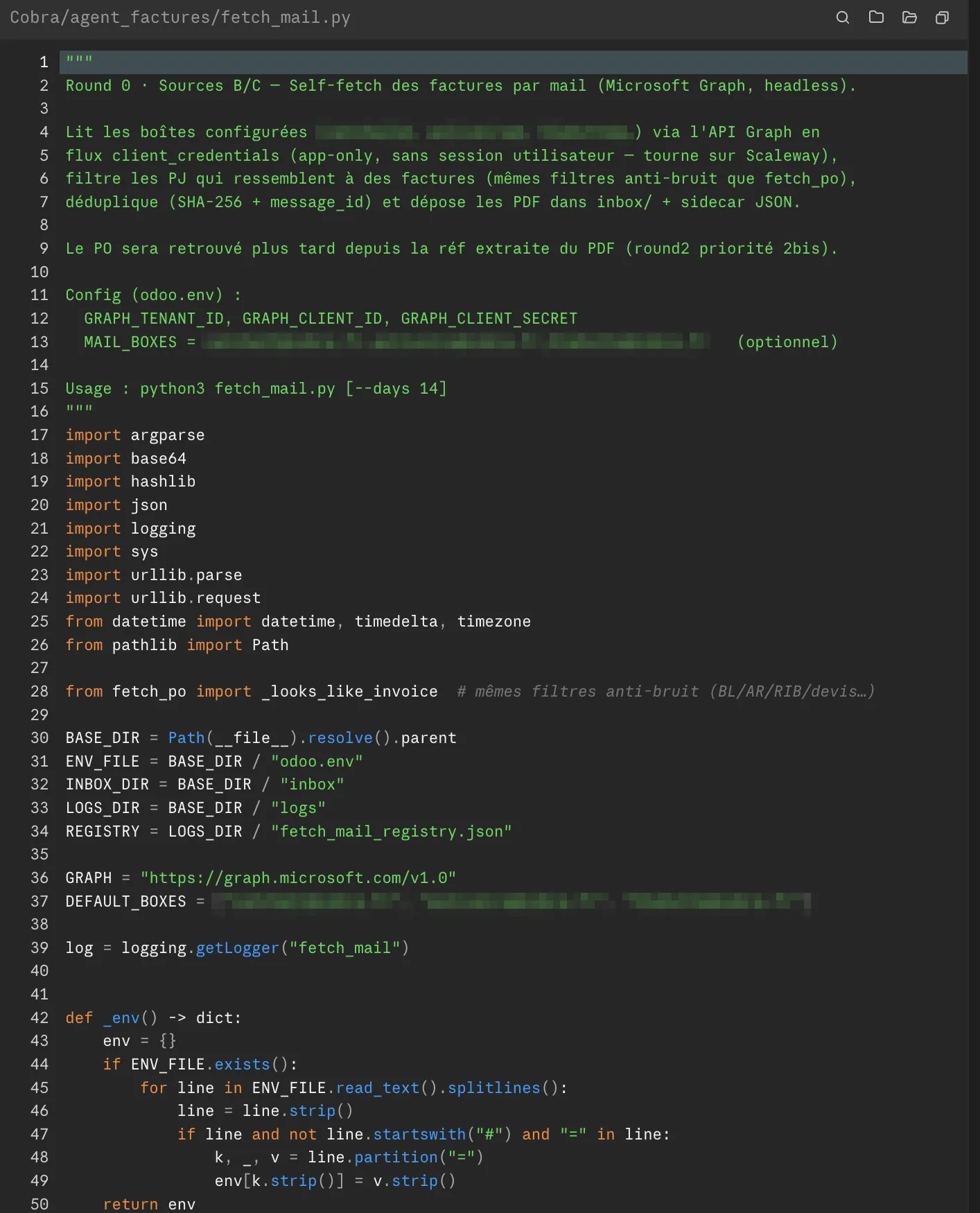
fetch_mail.py), written with Claude Code: Microsoft Graph application flow, anti-noise filters, SHA-256 deduplication, PDF drop-off. Build in public right down to the code.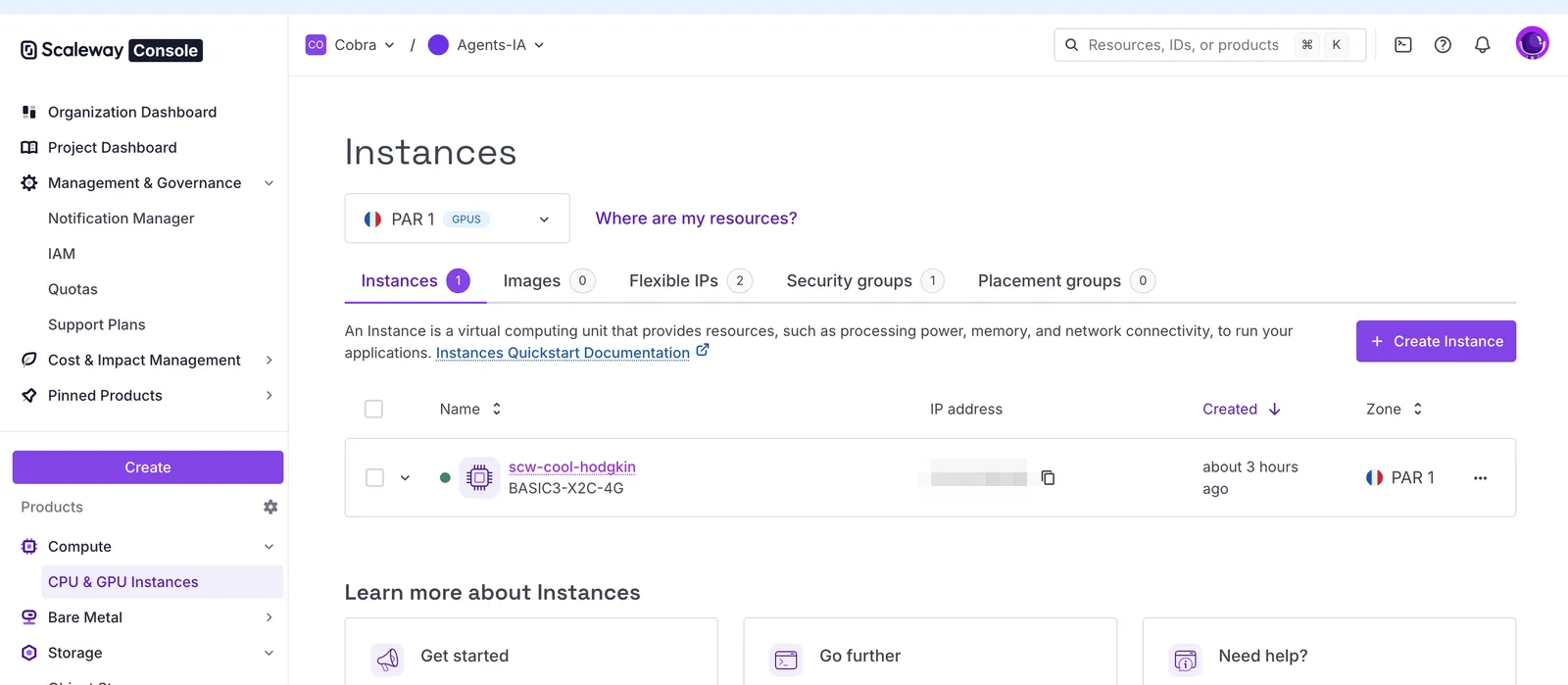
What a run actually looks like
Here's the log of a real 15-minute cycle (37 seconds of execution). Nine invoices queued, and above all: every possible outcome shows up — approval, already-booked duplicate, price gap that blocks, order not found, non-invoiceable document rejected. The agent is the one sorting, applying the same rules to every line.
$ python agent_loop.py --write

2026-06-17 08:15:00 [INFO] agent_loop  — ═══ Loop run 2026-06-17T08:15:00Z (write=True) ═══
2026-06-17 08:15:03 [INFO] fetch_po    — [A] Odoo PO: 261 POs scanned · 4 candidate attachments · 2 collected · 2 dedup
2026-06-17 08:15:10 [INFO] fetch_mail  — [B/C] Graph: 3 mailboxes (***@cobra.fr) → 87 messages · 31 PDF attachments
2026-06-17 08:15:10 [INFO] fetch_mail  —        → 7 collected · 22 dedup · 2 ignored (delivery note / payment reminder)
2026-06-17 08:15:10 [INFO] agent_loop  — 9 new invoices in the processing queue

2026-06-17 08:15:13 [INFO] extract     — [1/9] FA-2026-04417 · Supplier-A → LLM ok (confidence 0.94 · 3 lines · net 1,642.80 €)
2026-06-17 08:15:14 [INFO] orchestr.   — [1/9] PO P06143 found · 3/3 lines matched · max price gap +1.2% → ✅ APPROVE
2026-06-17 08:15:14 [INFO] orchestr.   —        draft 150148 created · PDF attached · card → "To approve" channel
2026-06-17 08:15:17 [INFO] extract     — [2/9] 26060940 · Supplier-B → regex parser (confidence 0.99 · 1 line + WEEE 0.75 €)
2026-06-17 08:15:18 [INFO] orchestr.   — [2/9] PO P06122 · invoice already booked (ref exists) → 🟣 ALREADY PROCESSED → mirror card "To pay"
2026-06-17 08:15:21 [WARN] orchestr.   — [3/9] PROF-5582 · Supplier-C · PO P06097 · line 2: 214.00 € vs 180.00 € (+18.9%) > 5%
2026-06-17 08:15:21 [WARN] orchestr.   —        → 🟠 INTERVENTION (ecart_prix) · no draft created · card → "To approve"
2026-06-17 08:15:24 [INFO] extract     — [4/9] F007241 · Supplier-D → LLM ok (confidence 0.91 · 6 lines · shipping 12.00 €)
2026-06-17 08:15:25 [WARN] orchestr.   — [4/9] no PO ref in the document (email source) → ⏸️ TO SORT · parked · no card
2026-06-17 08:15:27 [INFO] extract     — [5/9] AVR-1180 · Supplier-E → LLM ok (confidence 0.86)
2026-06-17 08:15:28 [WARN] orchestr.   — [5/9] PO P05904 · line already fully invoiced (qty_invoiced ≥ qty) → 🟠 INTERVENTION (doublon)
2026-06-17 08:15:30 [INFO] extract     — [6/9] FC-77310 · Supplier-F → LLM ok (confidence 0.92 · 2 lines)
2026-06-17 08:15:31 [WARN] orchestr.   — [6/9] PO ref "P06210" not found in Odoo → 🟠 INTERVENTION (commande_introuvable)
2026-06-17 08:15:33 [INFO] orchestr.   — [7/9] FA-2026-04420 · Supplier-A · PO P06151 · 2/2 matched · +0.4% → ✅ APPROVE → draft 150149
2026-06-17 08:15:35 [INFO] orchestr.   — [8/9] 26061002 · Supplier-B · PO P06160 · 1/1 matched · 0.0% → ✅ APPROVE → draft 150150
2026-06-17 08:15:36 [INFO] orchestr.   — [9/9] BL-99317 → non-invoiceable document (delivery note) → rejected

2026-06-17 08:15:37 [INFO] agent_loop  — [PIPELINE] {'total': 9, 'valider': 3, 'deja_traite': 1, 'intervention': 3, 'a_trier': 1, 'rejete': 1, 'erreur': 0}
2026-06-17 08:15:37 [INFO] agent_loop  — ═══ Run finished in 37s — 3 drafts created, 3 intervention cards ═══
Of these 9 invoices: 3 approved and moved to an Odoo draft linked to their order, 1 already booked (payment mirror card), 3 parked for intervention (price gap, duplicate, order not found), 1 to sort (no order reference) and 1 rejected (delivery note, not an invoice). None slipped off-chain — which is precisely what human data entry didn't guarantee.
A note on the channels: "To approve" is the human action queue — it gathers both the clean drafts ready to approve in one click and the parked cases to handle (price gap, duplicate…). The "To pay" and "Paid" channels, meanwhile, track the payment state on the Odoo side.
5. The numbers: volume, time, ROI
Measured volume: ~349 supplier invoices/month, i.e. ~80/week.
Human time per invoice (import, line-by-line check, reconciliation) is on the order of 7 to 12 minutes with manual entry. Taking a median of 9 minutes across 80 invoices/week:
| Human time / week | |
|---|---|
| Before the agent (entry + checking + reconciliation) | ~12 hrs (≈ 0.35 FTE) |
| With the agent (approving Teams cards + intervention cases) | ~2 to 2.5 hrs |
| Net time saved | ~9 to 10 hrs / week |
6. What the agent does NOT do
To stay credible, you have to be clear about the scope. The agent guarantees the invoice → order link and price consistency. It does not do:
- Reconciliation / bank matching. Payment and the SEPA batch stay a human and banking step. What the agent brings on the payment side is visibility, not execution: three Teams sub-channels (To approve / To pay / Paid) mirror the Odoo payment state. But by delivering invoices that are clean and linked to their order, it makes downstream reconciliation trivial and reliable — where a detached invoice makes it manual and fragile.
- "In-place" updates of the Teams cards. On each state change, the agent posts a new mirror card in the right channel — it doesn't modify the existing card (a Power Automate webhook limitation). A true live-update via a Teams bot is identified as the next step, not done yet.
- Cleaning up the past. The ~1,500 detached invoices and the 241 lingering unpaid ones remain a cleanup project. The agent doesn't fix the history — it guarantees the future stays clean.
7. What this illustrates
The lesson isn't "AI processes invoices." It's: when a business process drifts because it depends on human discipline, the right move isn't to add more training or oversight — it's to code the rule so it applies on its own, always, without exception.
The agent isn't "faster than an accountant." It's incapable of drifting. That's a different property, and it's the one that durably fixes an accounting chain, where no amount of human effort could.
What's next
- Live-update of the Teams cards (Teams bot rather than webhook) for a card that updates in place.
- Secrets management via a dedicated vault.
- Cleanup project for the history (detached invoices, lingering unpaid ones) — partly automatable once the incoming flow is under control.
- Real measurement of before/after times to replace the market range with our own figures.